
Where do downloads go on iPhone? How to find, move and delete them
Published October 21, 2026
When you download a file in Safari on iPhone, it goes to the Downloads folder in the Files app, in iCloud Drive or on the phone itself depending on a setting. Photos you save from a web page go to the Photos app instead.
This guide shows how to find a download, change where Safari saves, delete files properly (Files has its own Recently Deleted folder) and what to do with downloads you would rather not leave in a general-purpose folder. Menu names depend on your iOS version.
How do I find a file I downloaded on iPhone?
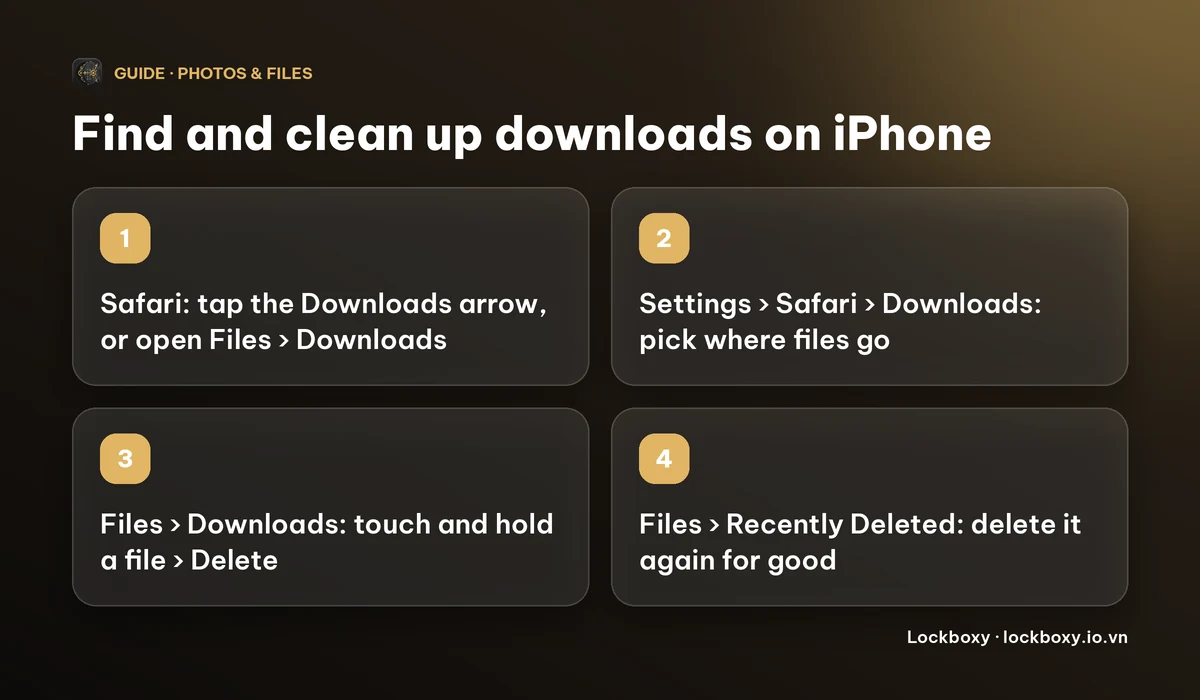
- 1In Safari, tap the Downloads button (a circle with a down arrow) that appears next to the address bar while and after you download. Tap a file in the list to open it, or tap the magnifying-glass icon next to it to jump to it in Files.
- 2Or open the Files app, tap Browse, and open Downloads under iCloud Drive or On My iPhone.
- 3If you cannot find it, use the search field at the top of Files and type part of the file name.
Downloads from other apps do not always land there. Mail and Messages attachments stay in those apps until you choose Save to Files from the Share sheet, and photos or videos saved from a page go to Photos.
How do I change where Safari saves downloads?
- 1Open Settings and choose Safari (on recent iOS versions it sits under Apps).
- 2Tap Downloads.
- 3Pick iCloud Drive, On My iPhone or Other, then choose a folder in Other if you want a specific one.
The choice matters for privacy and storage. Files kept in iCloud Drive sync to your other devices signed in with the same Apple ID and count towards your iCloud storage. On My iPhone keeps them on that phone only.
How do I delete downloads for good?
- 1Open Files → Browse → Downloads.
- 2Touch and hold the file, then tap Delete. To clear several, tap the three-dot menu, choose Select, tick the files and tap the bin.
- 3Go back to Browse and open Recently Deleted. Select the file and delete it again. Files keeps deleted items there for a limited time before removing them (30 days on current iOS versions), so a file you deleted is not gone until you empty this folder.
- 4If the Downloads folder was in iCloud Drive, the file is removed from your other devices as well.
A download can also be sitting in another place: a copy you saved to Photos, an attachment in Mail, or a copy you shared to another app. Delete those separately.
What about downloads I do not want in a general folder?
The Downloads folder is easy to open: anyone with your unlocked phone can browse it, and it may sync to iCloud. For documents such as bank statements, contracts or scans, a better home is somewhere locked. See how to password protect a PDF on iPhone and how to password protect a folder on iPhone for what the built-in options do and do not cover.
Lockboxy is an iPhone app that keeps files in an encrypted vault with its own passcode, and its Private Browser can send a download straight there. It is a convenience for keeping a file out of your Downloads folder, not a way to download anything anonymously.
How does a download go straight into the vault?
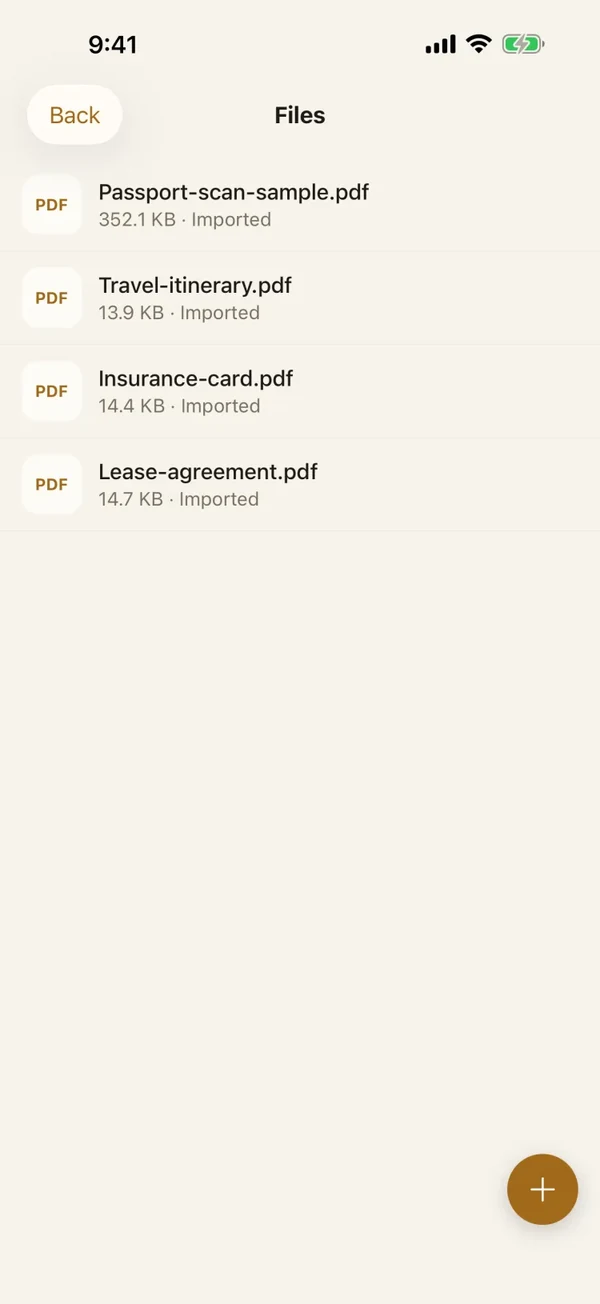
- 1Open Lockboxy, unlock the vault and open the Private Browser tab.
- 2Open a page that links to a file, such as a PDF, and tap the link.
- 3The app downloads the file and saves it into the vault's Files area, encrypted. It does not go into your iPhone's Downloads folder.
- 4Open the Files area in the vault to find it.
Limits to know: it works on a best-effort basis, and a file that sits behind a login on the website can fail to download (the app shows an error rather than saving a login page as a file). If that happens, download it in Safari, then move it into the vault from the Share sheet and delete the original, including the copy in Recently Deleted.
What does it cost and what are the limits?
- Safari downloads and the Files app are free and built in.
- Files in Lockboxy: the free plan holds up to 10 files and Premium removes that limit. Prices are on the Premium page and the app shows the exact price before you buy.
- If you forget the vault passcode and did not set a Recovery Key (Premium), nobody can open the vault, including us.
- Apple renames menus between iOS versions. If a step does not match your screen, use Search in Settings.
Frequently asked questions
Where do Safari downloads go on iPhone?
To the Downloads folder in the Files app, either in iCloud Drive or On My iPhone depending on Settings → Safari → Downloads. Photos saved from a page go to the Photos app.
How do I change the Safari download location on iPhone?
Open Settings, choose Safari, tap Downloads and pick iCloud Drive, On My iPhone or Other. Menu paths vary a little between iOS versions.
Does deleting a download in Files remove it completely?
Not yet. It moves to Recently Deleted in Files, where you delete it again to remove it. Copies in Photos, Mail or iCloud Drive on other devices are separate.
Can I stop downloads syncing to iCloud?
Yes. Set Safari's download location to On My iPhone, then move any existing files out of the iCloud Drive Downloads folder.
Can a download go straight into Lockboxy?
Yes, from the Private Browser inside the vault. The file is saved encrypted in the vault's Files area. Downloads that need a website login can fail.
Want a private place with its own passcode?
Lockboxy encrypts photos, videos, files and notes on your device, behind a passcode separate from your phone's. No account, no server.
Get Lockboxy on the App StoreMore guides
- What does Private Browsing on iPhone actually hide?
- How to password protect a PDF on iPhone
- How to password protect a folder on iPhone
- How to stop iPhone photos syncing to your iPad and Mac
- How to hide photos on iPhone (and what “hidden” really protects)
- How to lock apps on iPhone: Face ID lock, hiding apps and older-iOS workarounds
- How to store photos of your ID safely on your phone
- How to permanently delete photos on iPhone (and every copy you forgot)
- How to lock notes on iPhone with a password or Face ID
- How to store passwords safely on your phone
- How to lend your iPhone without exposing your photos
- How to store a seed phrase safely (and what not to do)
- What to do before sending your iPhone for repair
- How to take photos that don't save to your iPhone camera roll
- How to scan documents on iPhone (no app needed) and store them safely
- How to store 2FA backup codes safely (and where not to)
- How to handle sensitive screenshots on iPhone (bank transfers, OTPs, IDs)
- How to keep voice recordings private on iPhone
- What to do when your iPhone is lost or stolen
- How to erase your iPhone before selling it
- Lockboxy vs the iPhone Hidden album: which should you use?
- Lockboxy vs locked notes on iPhone: which is better for private notes?
- Phone privacy for livestream sellers: keep customer data off the stream
- Keeping client documents private: a phone routine for real-estate agents
- How to hide contacts on iPhone: what really works
- How to tell if someone went through your iPhone
- How to move private photos to a new iPhone
- How to remove location data from photos on iPhone before sharing
- How to store bank card details safely on your phone
- How to find and share a saved Wi-Fi password on iPhone
- How to stop unwanted photos from showing up in Memories and Featured Photos on iPhone
- How to control which photos an app can access on iPhone
- How to find the Hidden album on iPhone (and why it may be missing)
- How to show someone a photo on your iPhone without them swiping to the others
- How to stop WhatsApp saving photos to your iPhone camera roll
- How to stop photos from Messages showing up in your iPhone Photos app
- How to password protect a video on iPhone
- How to hide private content in the iPhone App Switcher
- How to back up your iPhone photos without iCloud
- How to stop photos from showing up in iPhone Spotlight search
- What can someone do with your locked iPhone? How to limit Lock Screen access
- Why is there a green or orange dot on my iPhone? How to see which app is using your camera or microphone
- How to keep a private journal on iPhone
- How to stop unwanted AirDrops on iPhone
- How to keep medical documents and insurance cards private on iPhone
- How to change or remove the camera button on the iPhone Lock Screen
- Forgot the passcode of your private photo vault app? What you can and can't recover
- What happens to your iPhone photos and private data when you die? How to set up a Legacy Contact
- You copied a password on iPhone: who can see your clipboard, and how to stop apps pasting from it
- What is Stolen Device Protection on iPhone, and should you turn it on?
- Where to store PIN codes and door codes on iPhone
- How to share a password with family on iPhone without sending it in a chat
- Where to store your Apple Account recovery key (and what if you lose it)
- How to see saved passwords on iPhone (and what to do when one is missing)
Questions about how Lockboxy works? Read the FAQ