Where to store PIN codes and door codes on iPhone
Published November 2, 2026
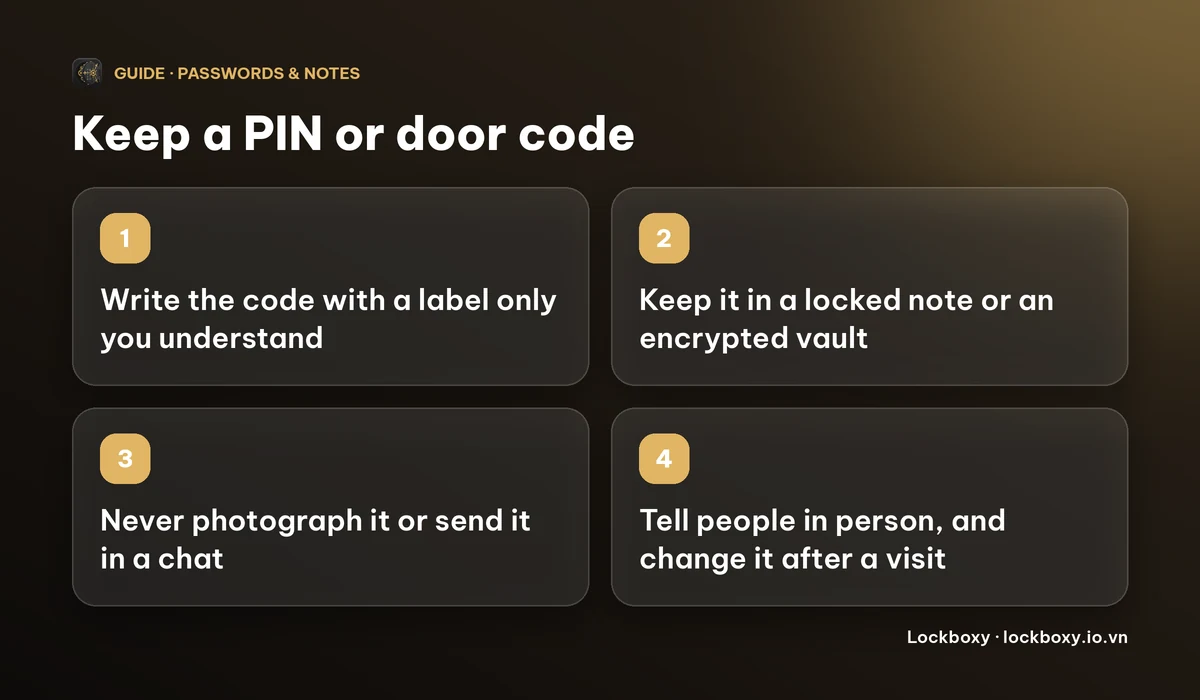
To store a PIN code, a door code or a safe combination on your iPhone, put it in a locked note or in an encrypted vault with its own passcode, and give it a label only you understand. Do not keep it in a photo, an open note or a chat with yourself.
These small numbers get forgotten right when you need them: the holiday flat's key box, the office gate, the home safe, the storage unit, the Wi-Fi router's admin PIN. This guide shows safe places for them on iPhone, what to avoid, and how Lockboxy's Wallet can hold them. Menu names change between iOS versions, so check your own screen if a label differs.
Why is a photo or an open note a bad place for a code?
The easy places are the risky ones. A photo of the safe's keypad, a note titled "Safe code" or a message to yourself can be read by anyone who has your unlocked phone for a minute. Photos can also sync to other devices and appear in the photo picker of apps you give access to.
A code with a clear label is the worst case, because it tells a stranger both the number and what it opens. Treat a door code like a key: you would not tape a house key to the door and write "front door" on it.
Which codes are worth writing down at all?
- Door, gate and key-box codes you do not use daily, such as a holiday rental or a friend's building.
- Safe and padlock combinations, and the PIN for a storage unit.
- Router admin PINs, SIM PUK codes and appliance codes you only need once a year.
- Codes you must hand to someone else, such as a cleaner or a delivery person.
Your bank card PIN is different. Many banks advise memorising it rather than writing it down. If you ever do record one, keep it in an encrypted place and do not note which card it belongs to. See how to store bank card details safely for the card itself.
How do I keep a code in a locked note on iPhone?
A locked note is the simplest built-in option, and it needs no extra app.
- 1Open Notes and create a new note. Use a title that does not say what the code opens, for example "Item 7" and not "Office gate".
- 2Type the code and any hint you need, such as "left side, press twice".
- 3Tap the More button in the note and choose Lock. Set a separate Notes password rather than reusing your iPhone passcode, then tap the lock icon at the top of the note so it closes.
- 4Check that the lock icon shows. Some notes cannot be locked, for example notes that are shared with others.
How to lock notes on iPhone covers the password, Face ID and what to do if you forget it. A locked note works well for a handful of codes. It gets awkward when you want a numeric entry with a Copy button or an encrypted backup of everything.
Can the Passwords app hold a PIN?
The Passwords app, or any password manager, is built for logins: a website, a username and a password. You can add a login and put the code in the password field or the notes, but nothing in the app is shaped for a PIN, so the entry is easy to mislabel. It is a fair choice if you already live in that app. If you do, give the entry a neutral name, and do not paste the code into other apps afterwards. Copying a secret leaves it on the clipboard until something replaces it.
How do I share a door code without leaving a trail?
- Say it aloud, in person or on a call, rather than typing it into a chat. Messages stay in the chat history of both phones, and often in a backup.
- If you must write it, send it once, ask the person to delete it, and delete it yourself.
- Use a temporary code where the lock allows it, and change the permanent one after a guest has stayed or a worker has finished.
- Do not send a photo of the keypad with the code on a sticker. Anyone who sees the photo sees the number.
How can Lockboxy store a PIN?
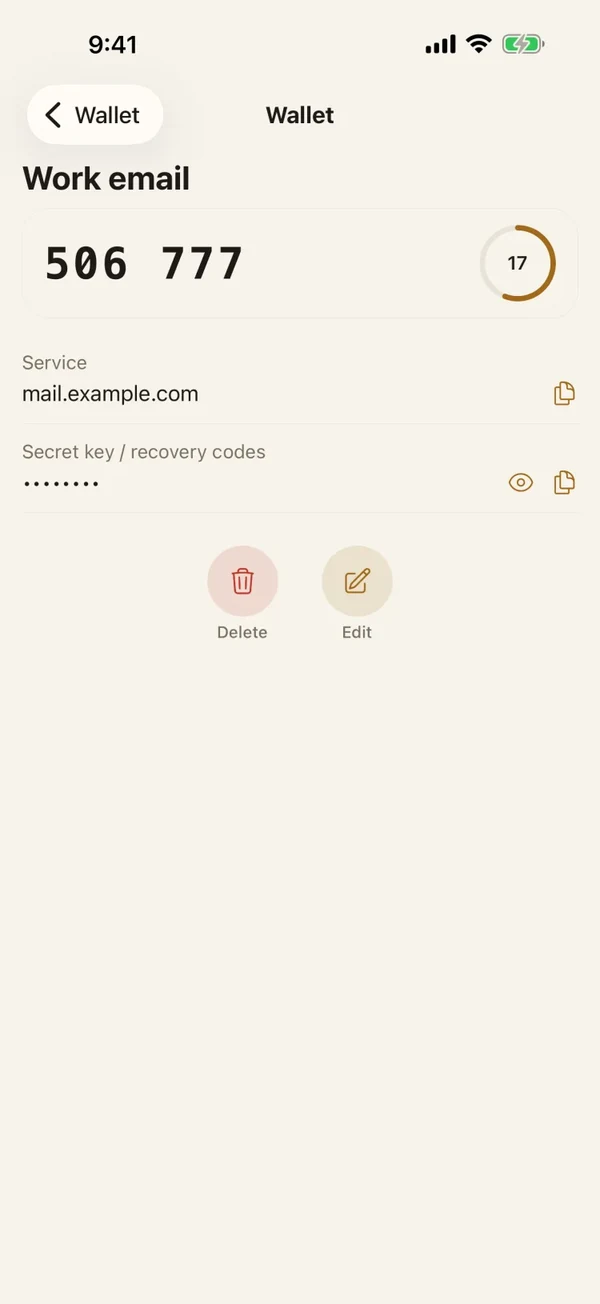
Lockboxy is a private, encrypted vault app for iPhone. Its Wallet has a PIN code entry type, so a code is kept as a structured entry and not as a loose photo or note. Everything is encrypted with AES-256-GCM on your device behind a passcode of its own, there is no account, and no server holds a copy.
- 1Open Lockboxy with its passcode and go to the Wallet tab.
- 2Tap Add entry and choose PIN code.
- 3Fill in the Title, for example "Item 7", and the PIN. The PIN field uses the numeric keyboard and is masked with dots by default. Notes are optional, so add the hint there.
- 4Save. Tap Show on the entry when you need to read the code, or Copy to paste it. Lockboxy clears a copied value from the clipboard about 30 seconds later.
A deleted entry goes to the Recycle Bin first, so you can restore it if you deleted it by mistake. The same Wallet also holds passwords, bank cards, Wi-Fi logins and 2FA codes. The PIN field takes numbers, so a combination that contains letters belongs in the Notes field of a password entry instead.
What are the limits of this?
- If you forget the vault passcode, nobody can open it, including us. Premium lets you create a Recovery Key in advance, so create one and keep it somewhere safe.
- A code kept on one phone is lost with the phone. Keep an encrypted backup (Premium), or a second copy somewhere that is not your wallet or your desk drawer.
- Wallet entries are unlimited on the free plan. What Premium adds is on the Premium page, and the app shows the exact price before you buy.
- If a code may have leaked, change it. A vault does not replace that, and neither does a locked note.
More answers are in the Lockboxy FAQ.
Frequently asked questions
Where should I store a door code on my iPhone?
Use a locked note with a separate Notes password, or an encrypted vault such as Lockboxy's Wallet. Avoid photos, open notes and chats with yourself, because anyone holding your unlocked phone can read them.
Is it safe to put a PIN in Apple Notes?
Only if the note is locked. Choose Lock and set a Notes password that is not your iPhone passcode, and give the note a title that does not say what the code opens.
Should I write down my bank card PIN?
Many banks advise memorising it. If you do record it, keep it in an encrypted place and do not say which card it belongs to.
How do I share a door code safely?
Say it in person or on a call. If you must send it in writing, send it once, ask the person to delete it, and change the code after a guest or a worker has used it.
Does Lockboxy have a PIN entry type?
Yes. In the Wallet, tap Add entry and choose PIN code. The PIN is masked by default, encrypted on the device and never uploaded.
Want a private place with its own passcode?
Lockboxy encrypts photos, videos, files and notes on your device, behind a passcode separate from your phone's. No account, no server.
Get Lockboxy on the App StoreMore guides
- How to store passwords safely on your phone
- How to lock notes on iPhone with a password or Face ID
- How to store bank card details safely on your phone
- Lockboxy vs locked notes on iPhone: which is better for private notes?
- How to hide photos on iPhone (and what “hidden” really protects)
- How to lock apps on iPhone: Face ID lock, hiding apps and older-iOS workarounds
- How to store photos of your ID safely on your phone
- How to permanently delete photos on iPhone (and every copy you forgot)
- How to lend your iPhone without exposing your photos
- How to store a seed phrase safely (and what not to do)
- What to do before sending your iPhone for repair
- How to take photos that don't save to your iPhone camera roll
- How to scan documents on iPhone (no app needed) and store them safely
- How to store 2FA backup codes safely (and where not to)
- How to handle sensitive screenshots on iPhone (bank transfers, OTPs, IDs)
- How to keep voice recordings private on iPhone
- How to stop iPhone photos syncing to your iPad and Mac
- What to do when your iPhone is lost or stolen
- How to erase your iPhone before selling it
- Lockboxy vs the iPhone Hidden album: which should you use?
- Phone privacy for livestream sellers: keep customer data off the stream
- Keeping client documents private: a phone routine for real-estate agents
- How to hide contacts on iPhone: what really works
- How to tell if someone went through your iPhone
- How to move private photos to a new iPhone
- How to password protect a folder on iPhone
- How to remove location data from photos on iPhone before sharing
- How to find and share a saved Wi-Fi password on iPhone
- How to stop unwanted photos from showing up in Memories and Featured Photos on iPhone
- How to control which photos an app can access on iPhone
- How to find the Hidden album on iPhone (and why it may be missing)
- How to show someone a photo on your iPhone without them swiping to the others
- How to stop WhatsApp saving photos to your iPhone camera roll
- How to stop photos from Messages showing up in your iPhone Photos app
- How to password protect a video on iPhone
- How to password protect a PDF on iPhone
- What does Private Browsing on iPhone actually hide?
- Where do downloads go on iPhone? How to find, move and delete them
- How to hide private content in the iPhone App Switcher
- How to back up your iPhone photos without iCloud
- How to stop photos from showing up in iPhone Spotlight search
- What can someone do with your locked iPhone? How to limit Lock Screen access
- Why is there a green or orange dot on my iPhone? How to see which app is using your camera or microphone
- How to keep a private journal on iPhone
- How to stop unwanted AirDrops on iPhone
- How to keep medical documents and insurance cards private on iPhone
- How to change or remove the camera button on the iPhone Lock Screen
- Forgot the passcode of your private photo vault app? What you can and can't recover
- What happens to your iPhone photos and private data when you die? How to set up a Legacy Contact
- You copied a password on iPhone: who can see your clipboard, and how to stop apps pasting from it
- What is Stolen Device Protection on iPhone, and should you turn it on?
- How to share a password with family on iPhone without sending it in a chat
- Where to store your Apple Account recovery key (and what if you lose it)
- How to see saved passwords on iPhone (and what to do when one is missing)
Questions about how Lockboxy works? Read the FAQ